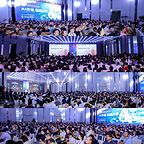
SHENZHEN, China, Oct. 18, 2026 /PRNewswire/ — The 5th GMIF Innovation Summit (Global Memory Innovation Forum 2026, GMIF2026) recently concluded at the Renaissance Shenzhen Bay Hotel. Co-hosted by the Shenzhen Memory Industry Association (SMIA) and the School of Integrated Circuits at Peking University, the summit was themed “The Future Built on AI Memory and Storage.” Now in its fifth edition, GMIF has grown from a regional industry gathering into a benchmark for the global semiconductor memory ecosystem, with diversified programs including keynote sessions, an investment forum, product exhibitions, a global livestream, and a golf friendship match, all centered on the value of memory and storage in the token economy and the AI inference era.
In the opening remarks by Rixin Sun, President of Shenzhen Memory Industry Association (SMIA), GMIF’s growth over five consecutive editions was traced from its early days to today. As a platform for global exchange, GMIF is built around the memory value chain, linking wafer IDMs and players in controllers, modules, packaging and testing, equipment and materials, and end applications to promote technical exchange, supply-demand matching, and ecosystem cooperation.
President Sun noted that as AI evolves from generative to agentic, inference efficiency, data scheduling, and system coordination have become shared priorities. Collaboration across the value chain is no longer a traditional supply-demand relationship, but a deeper partnership built around workload requirements, joint product definition, and scenario validation. Looking ahead, GMIF will pursue a more specialized and differentiated format, connecting memory companies with AI compute and end-application players worldwide.
Capital Meets Technology: Memory & Storage Moves to the Center of AI Infrastructure
As AI shifts from model training to large-scale commercial inference, the token is becoming a new unit of value. Inference demands low latency, high concurrency, and sustained throughput, which places memory and storage bandwidth, capacity, and energy efficiency among the variables that shape overall system efficiency and cost.
Daniel Yen of Morgan Stanley projected that global data center capital expenditure will stay strong in the coming years, with more than half of cloud data center capex expected to go to memory & storage (excluding HBM) by 2027. Yen identified six innovation paths to overcome the “memory wall” challenge: process migration, design changes, advanced packaging, memory peripherals, PIM/CIM, and new materials.
Prof. Yimao Cai, Dean of the School of Integrated Circuits at Peking University, pointed out that HBM remains central to high-end AI compute, but yield, cost, and thermal constraints limit broader adoption. NAND-based high-bandwidth technologies such as HBF have become a major research focus because of their cost advantage, and hybrid multi-media architectures could balance performance, capacity, and cost for deploying models with hundreds of billions of parameters.
Kevin Yoon, CVP & CTO of Samsung Memory China at Samsung Electronics, described how agents are generating massive KV cache demand and driving rapid iteration of tiered storage, citing Samsung’s work on Z-NAND, PCIe Gen6 SSDs, and ultra-high-capacity data center SSDs. Maya Zhang, Senior Director of Product Marketing from Sandisk, called this the first year of the “inference boom.” As inference reaches commercial scale, AI data centers are shifting from cost centers to value and capacity centers, and the evaluation framework is moving from TCO to TVO. NAND is becoming a strategic core component of AI, and the SSD is becoming a “token battery” that greatly improves the economics of the industry through token reuse.
Solidigm and Arm focused on the evolution of system-level design. Benny Ni, GAR Sales VP at Solidigm, noted high-capacity QLC SSDs are being adopted faster, and that memory offloading has moved from an alternative to a core design paradigm for data centers, while liquid cooling has become a prerequisite for unlocking high-end storage performance. John Xavier Lionel, Head of Global Storage Business at Arm, shared competition in the AI era is shifting from simply chasing higher TOPS to building a more efficient system balance among compute, memory, storage, and data movement. Arm’s cloud-edge-device continuum framework balances power, capacity, bandwidth, latency, security, and cost constraints at each tier, so that “the right AI workload runs in the right place.”
Moving from the cloud to the edge, Stanley Huang, AVP of Silicon Motion, stressed that devices are the ultimate carrier of AI experiences and that intelligent storage directly determines real-world device performance. Its PerformaShape technology allocates resources flexibly across different agents and greatly improves read/write consistency.
Sam Sun, Chairman of BIWIN, explained that large-scale AI inference is extending memory demand from data centers to the edge and endpoints, where differing needs in capacity, performance, power, size, and reliability are pushing storage from general-purpose specifications toward deep matching with specific scenarios and platforms. Drawing on full-stack capabilities from media selection and controller and firmware development to advanced packaging, testing, and volume delivery, BIWIN works closely with customers, platforms, and chip makers to tailor products to each use case, shortening development and validation cycles and improving system space, energy efficiency, and performance.
Token Factories Move Enterprise AI from Pilot to Production
As the token becomes the core unit of value, producing tokens efficiently and at low cost has become a shared challenge for enterprise AI adoption worldwide, and the “token factory” is emerging as a new industry paradigm. Tao Zhou, General Manager of the Server Division of Lenovo ISG China, said 80% of enterprises have deployed at least one type of agent, yet fewer than 40% of projects can scale and deliver positive ROI. Lenovo has built a full-stack “token factory” paradigm spanning data governance, compute optimization, and security management to address this.
A solid token factory depends on underlying storage media and architecture. Numbers Law’s PMD (Parallel Magnetic Drive) technology and NEXWISE‘s “KuberCloud” token factory solution contributed to full-stack capability from hardware to compute scheduling and model operations. Infplane, Maxio, and Genstoraige lowered the deployment threshold for large on-device models through AI SSD tiered offloading and memory expansion.
Real-world applications are also deepening. SYNCORE has achieved vehicle-cloud embodied intelligence across the whole vehicle. Dify, with its private agent architecture, and Paratera, with its MaaS compute service platform, are moving AI from basic compute supply toward deeper industry intelligence services, accelerating the industrialization of AI.
40 Companies Showcase the Core of the AI Memory & Storage Chain
The concurrent exhibition brought together 40 companies across the full value chain, from memory chips and controllers to compute servers, AIDC services, packaging and testing equipment, and system applications, presenting the latest advances in AI memory and storage from around the world.
Memory IDMs and controller makers led with new products. SanDisk featured its iNAND AT EU752 automotive UFS 4.1, SN861 enterprise NVMe SSD, and BiCS8 QLC NAND. Silicon Motion introduced the SM8466 PCIe Gen6 16-channel controller and the SM2524XT controller for edge SSDs. Maxio, YEESTOR, and other Chinese controller makers showed flagship PCIe Gen4/Gen5 and UFS controllers with enhanced LDPC, a sign that China’s controller portfolio is taking shape and benchmarking itself against leading international standards.
Compute and token factory solutions were another highlight. Lenovo exhibited its WenTian series of AI training-and-inference integrated servers. NEXWISE presented its full-stack token factory hardware and software, with heterogeneous compute management and token-based billing. Paratera showed its intelligent compute cloud and supercomputing cloud services, and Numbers Law demonstrated its PMD (Parallel Magnetic Drive) technology, aimed at sharply raising HDD IOPS and throughput. Infplane, Genstoraige, and Quanxing introduced KV cache offload and memory-fusion AI SSD solutions that use storage to share the compute load and significantly cut deployment costs.
Module makers and full-scenario solution providers brought a wide range of products. BIWIN exhibited enterprise SSDs, CXL products, wide-temperature industrial storage, and embedded products spanning AI cloud, edge, and device. KingSpec, POWEV, Topdisk, Barycn, Jielong Storage, HIKSEMI, and others presented industrial-grade, automotive-grade, server, and embedded product families, demonstrating strong volume production and reliable delivery.
Equipment, testing, and materials suppliers rounded out the floor. Attach Point, MICROVIEW, and Maxwell Technologies showed die attach and bonding equipment for 2.5D/3D advanced packaging. OKN Technology, Acroview Technology, Hongjingwei, and Tytantest introduced test and burn-in systems covering SSD, DRAM, and NAND that can accurately reproduce high-load AI I/O scenarios. Hemei Jingyi and Silergy brought storage IC package substrates and dedicated power management ICs. From advanced packaging equipment to test validation to core components, this supporting ecosystem lays the manufacturing foundation for volume production of AI memory and storage and for Chinese suppliers expanding overseas.
GMIF2026 Annual Awards Unveiled: Global Memory & Storage Leaders Build an Open, Collaborative Ecosystem
To recognize companies that have made outstanding contributions to the memory and storage value chain, the summit established the GMIF2026 Annual Awards, which cover memory, compute, packaging and testing equipment, test systems, and end applications across AI infrastructure, and were judged on technological innovation, industry contribution, market service, and real-world results.
Honorees, including Samsung Semiconductor, SanDisk, Solidigm, CXMT, Arm, Lenovo, Dify, Silicon Motion, Infplane, Genstoraige, Numbers Law, Paratera, SYNCORE, NEXWISE, Maxio Technology, BIWIN, Topdisk, KingSpec, POWEV, Quanxing Technology, OKN Technology, Attach Point, COMIX, Barycn, LKAUTO, Maxwell Technologies, Hemei Jingyi, Silergy, Heyan Technology, ExTripod Electronics, UNIMOS, GBAT, and Tytantest, were recognized for standout achievements in technology breakthroughs, product deployment, ecosystem building, and the industry chain.
Global Livestream and Golf Friendship Match Extend the Boundaries of Industry Cooperation
To join the global ecosystem and expand international cooperation, the summit featured a special Global Livestream by Memory Brands on LinkedIn, Facebook, and YouTube. Eight brands presented online: BIWIN, Silicon Motion, Quanxing Technology, OKN Technology, KingSpec, Maxwell Technologies, ExTripod Electronics, and Silergy. They gave overseas audiences a direct look at China’s latest advances in memory chips, advanced packaging, test systems, and other core AI infrastructure components, connecting technology standards, supply chain resources, and market demand across regions.
The momentum carried into the next day. The GMIF2026 “BIWIN Cup” golf friendship match, exclusively sponsored by BIWIN, brought senior executives from across the global memory value chain to the course. After a day of intensive discussion at the main forum, the setting was more relaxed, but the conversations among technology, capital, and markets carried on, helping speed practical cooperation across borders and sectors.
Conclusion
Across the GMIF program, one message stood out: global AI competition is moving beyond the “single-point era” of peak GPU performance into a “system-level era” that integrates storage, compute, networking, and software. In the token economy, memory and storage is shedding its auxiliary role and becoming the strategic foundation of AI inference.
This edition of GMIF brought together capital outlook, frontier technology, product innovation, real-world practice, and ecosystem collaboration, and, with the awards, livestream, and networking events, carried the conversation from ideas to product showcases, overseas exposure, and business deals. Going forward, GMIF will stay focused on the industry’s frontier issues and connect key players across the global memory value chain, promoting joint standards, technology development, and market expansion to open a new chapter for the AI memory and storage industry.
About GMIF
Global Memory Innovation Forum (GMIF) is a premier annual gathering that connects the global memory and storage community. Featuring diverse activities including keynote speeches, roundtable dialogues, supply-demand match-making, product showcases, industry rankings, awards programs, and global livestreaming, GMIF brings together key enterprises across the memory and storage chain, technical experts, terminal companies and investment institutions to exchange insights, build partnerships, and create business opportunities. Learn more about GMIF, please visit https://www.gmif.com.cn/. Follow us on LinkedIn, YouTube and Facebook.
Media Contact:
Carina Gu, wenjing.gu@gmif.com.cn
View original content to download multimedia:https://www.prnewswire.com/news-releases/gmif2026-ai-inference-powers-the-token-factory-and-drives-system-level-rethinking-of-memory–storage-302912123.html
SOURCE Shenzhen Memory Industry Association (SMIA)








 Coin Market5 days ago
 Technology5 days ago
 Technology5 days ago
 Technology5 days ago
 Coin Market4 days ago
 Technology5 days ago
 Coin Market5 days ago
 Technology5 days ago